Portable long service leave returns from Xero, without the spreadsheet marathon
PLSL Return Helper turns your Xero payroll reports into the hours, days, weeks and ordinary pay each scheme asks for, and fills in the return spreadsheet you exported from the scheme's portal.
Not ready to add payroll files? Open the helper and press Try it with sample data to see the result for any scheme using a made-up business.
Free for returns with up to 5 workers. For bigger returns, email us for a free trial key or see pricing. A single web page: no account, no install, no sign-in to Xero.
See it work
A minute and a half, no sound, using a made-up business. No real payroll appears anywhere in it.
The last part of the video shows the browser forced offline, with the network panel open: the page still works and sends nothing. Nothing is tracked here either. This file is served from the same site, not from a video platform.
What you get
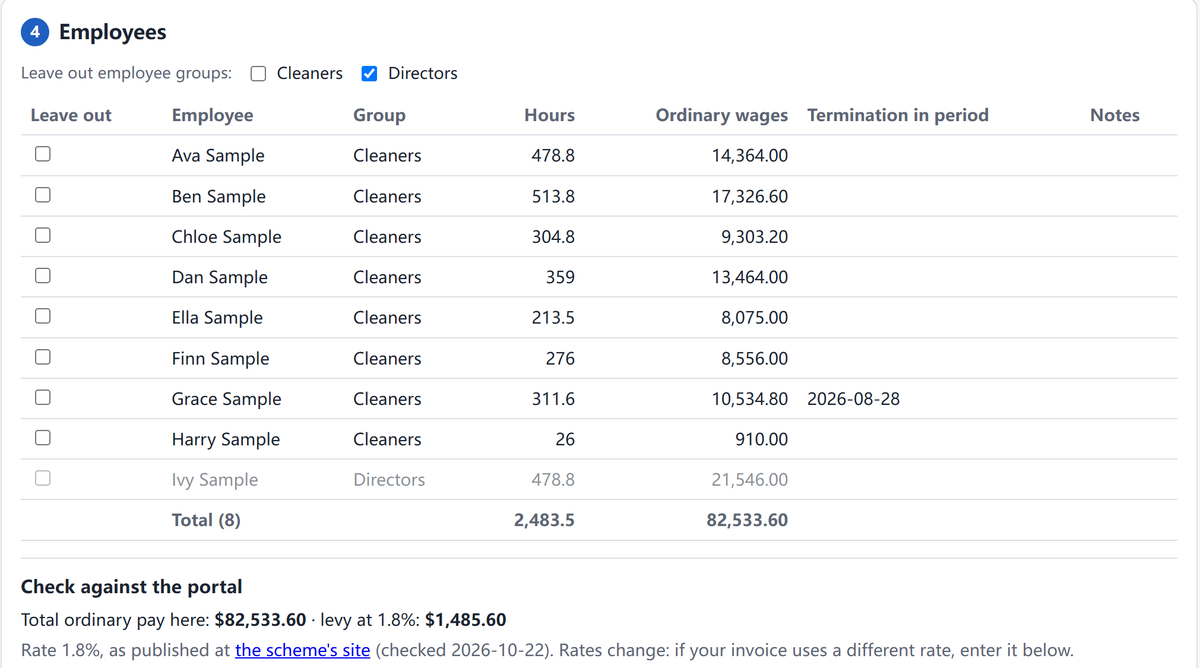
This is a Victorian contract cleaning return for a made-up business, straight from the helper. Hours and ordinary pay for each worker, the director left out by employee group, a leaver's end date picked up from Xero, and the levy worked out so you can check it against the portal's invoice. Behind each row is a check workbook listing every pay line that was counted.
All of it happens on your computer. The page reads your exports in the browser and never connects to Xero or to us; you export the reports yourself and drop them in.
Check it yourself
You don't have to take our word for it. Any of these takes a couple of minutes:
- Use it with the internet off. Press Download it above, switch off Wi-Fi (or unplug the network cable), and open the downloaded file. Add your Xero exports: everything works, because nothing needs to be sent anywhere.
- Watch the network. Open the helper, press F12 (on a Mac, Cmd+Option+I) and choose the Network tab. Add your files and download the results. Nothing goes out. (A download may show as a local
blob:entry: that's the file being saved, not sent.) - Read the lock on the page. The helper carries a content security policy with
connect-src 'none', which tells your browser to block any attempt by the page to send data. Right-click the helper, choose View page source, and search forconnect-src.
Want to try it before using real payroll? Press Try it with sample data in the helper: a made-up business, with every download marked SAMPLE.
Schemes covered
| State | Scheme | What it works out |
|---|---|---|
| Victoria | PLSA – contract cleaning, security, community services | Hours and ordinary pay (community services penalties at the base rate) |
| Victoria | LeavePlus – construction | Days and ordinary pay, as a list in the order you key it in |
| South Australia | Community services | Remuneration and weeks worked |
| South Australia | Construction | Service days (5-hour days) and remuneration, bi-monthly |
| Queensland | QLeave – construction, contract cleaning, community services | Days worked (annual) or gross ordinary wages |
| NSW | Community services, contract cleaning | Gross ordinary wages (cleaning: written straight into the portal's CSV) |
How it works
- Choose the scheme and the return period.
- Drop in your Xero exports: Payroll Activity Details (required), plus Timesheet Details, Leave Requests and Employee Remuneration where the scheme needs them.
- Add the return spreadsheet you exported from the scheme's portal.
- Check how each pay item is treated. Your choices are saved per client for next quarter.
- Download the filled return spreadsheet and upload it to the portal.
Guides
- How to prepare your Victorian PLSA quarterly return from Xero
Cleaning, security and community services: what counts, the reports to run, and the mistakes that cost time. - How to prepare your LeavePlus quarterly return from Xero
Victorian construction: full-time, part-time and casual days, the 38-hour cap, the 5-day month rule and ordinary pay. - How to prepare your NSW portable long service returns from Xero
Community services and contract cleaning: gross ordinary wages, $0 workers, the 5-day rule and the cleaning CSV. - How to prepare your South Australian portable long service returns from Xero
Community services weeks worked and remuneration; construction 5-hour service days, short-day pay and apprentices. - How to prepare your QLeave quarterly returns from Xero
Contract cleaning and community services: gross ordinary wages, the 5-day rule, annual rate of pay and the portal spreadsheet.
Who makes this
I'm Dirk, an independent developer working as DD Lab. I started on this after reading bookkeepers in the Xero community describe what one return costs them: one team spent 8 to 10 hours on the figures for 80 employees in a single quarter, before typing any of it into the portal. Every rule in the helper is checked against the scheme's own pages, and the changelog lists which page each one comes from.
If a figure looks wrong for your situation, or your scheme is missing, email me at support@plslhelper.com with the scheme and the pay item. No employee details needed.